Analysis
Tool Management and Workflow Execution
Bioinformatics tools are typically maintained through version control systems and can be published for community use. However, these tools often require additional configuration and setup. Currently, nf-core represents the most widely adopted bioinformatics community platform.
As referenced in the Credentials section, users must configure GitHub credentials with appropriate read permissions to access remote repositories containing the desired tools and workflows.
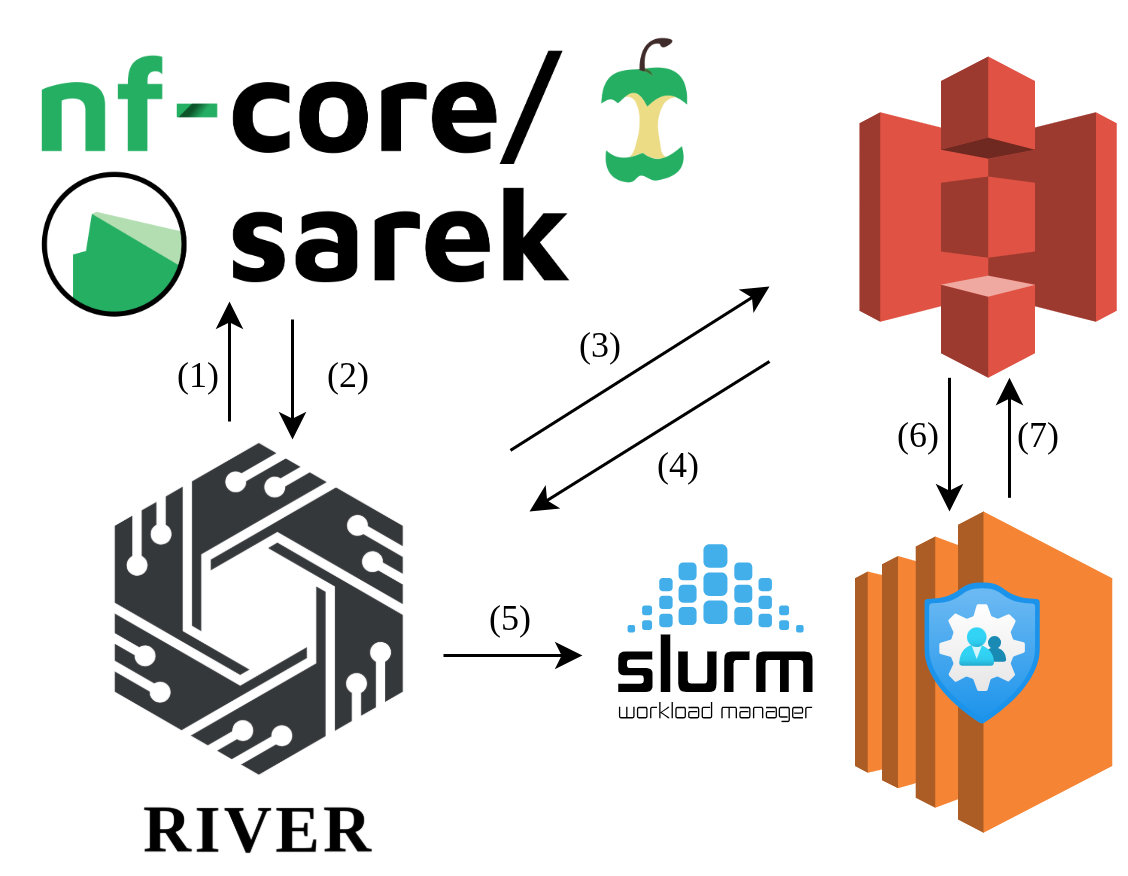
When a user selects a tool to execute, the system retrieves the associated parameters from the remote repository and presents an interactive interface. This interface enables users to configure parameter values while providing detailed descriptions for each field. The workflow illustrated in the figure operates as follows:
(1) Users configure GitHub credentials (personal access token), enabling RIVER to query the GitHub API for available release tags and their corresponding parameter schemas, including default values.
(2) The user interface displays the retrieved repository tags and the parameter schema for the latest release, allowing users to select the desired version of the tool or workflow for execution on the HPC environment.
(3) For parameters requiring file or directory inputs, users can leverage RIVER's integrated storage browser to select the appropriate data sources.
(4) The platform provides a comprehensive file browser feature, enabling users to efficiently navigate storage systems and select required input files or directories.
(5) Once all parameters are specified—including tool selection, version, input files, and cloud credentials—RIVER transmits this configuration to the HPC cluster and initiates the analysis job.
(6) Upon initialization, the job retrieves the specified input files from cloud storage using the provided credentials and executes the workflow according to the defined parameters.
(7) Upon completion, job outputs are written to the designated cloud storage location. The RIVER user interface provides real-time job status monitoring, log streaming capabilities, and direct access to output files through the integrated storage browser.
During job execution, status information is updated at regular 5-second intervals to reflect any changes, including job failure or termination events.