Role
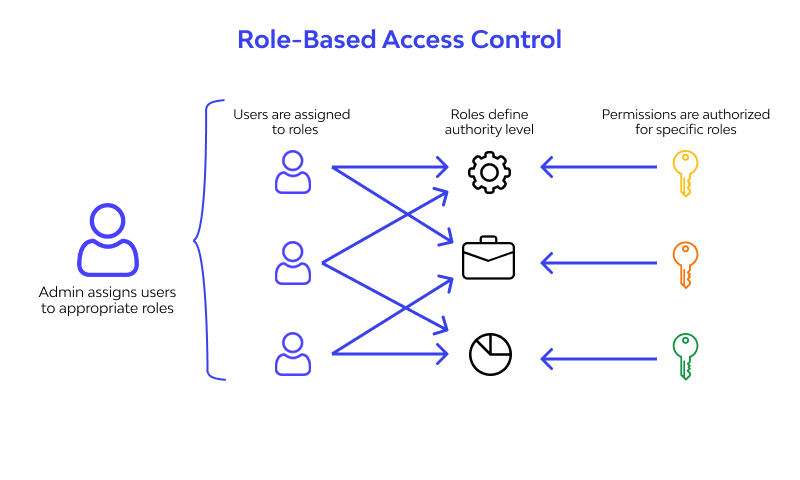
Role-Based Access Control (RBAC)
River implements a comprehensive Role-Based Access Control system to ensure secure and organized workspace management. Users are assigned specific roles that determine their level of access and the operations they can perform within the platform.
Permission Matrix
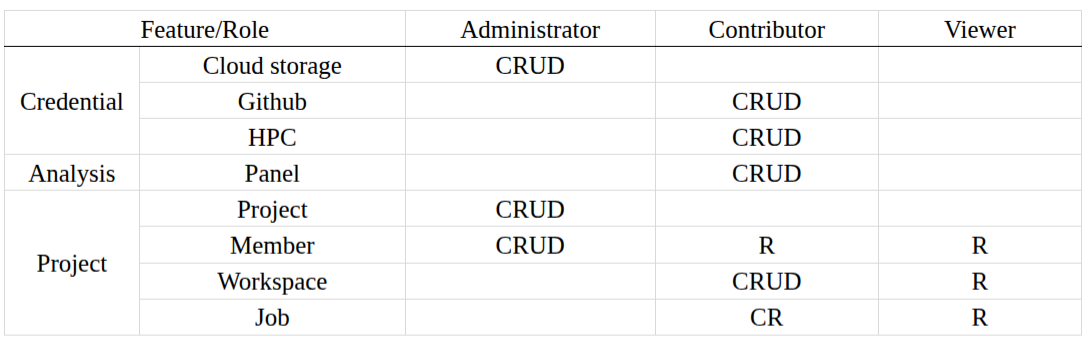
The following table outlines the capabilities associated with each role, based on CRUD operations:
- Create (C): Ability to create new resources
- Read (R): Ability to view and access resources
- Update (U): Ability to modify existing resources
- Delete (D): Ability to remove resources
Role Assignment
Workspace administrators can assign and modify user roles through the workspace settings interface. Role changes take effect immediately upon assignment.
Overview
River provides three distinct roles to manage access and permissions within your workspace:
Administrator
Administrators have full control over the workspace, including managing users, roles, and system settings.
Example teams:
- IT Operations team
- Security team
- Platform engineering team
Contributor
Contributors can create, edit, and manage content but cannot modify workspace settings or manage users.
Example teams:
- Development team
- Data science team
- Content creation team
Viewer
Viewers have read-only access to the workspace and can view content without making any changes.
Example teams:
- Auditing team
- Stakeholder groups
- External consultants